
Ask Claude who funds a nonprofit like yours.
GrantSnag connects to Claude, ChatGPT, and other AI assistants. You research funders by asking a question in plain English, and the answers come back from 13.9M grant records in filed IRS 990 returns, not from the open web.
You can already ask an AI about grants. Here’s what changes.
Ask any assistant to search the web for foundations that might fund an organization like yours, and it will find what has been written about: foundation websites, press releases, annual reports, the large well-covered names. That is the funding world pointed in one direction: from a foundation, out to the grants it chooses to publicize.
The direction you need is the other one. To learn which foundations have actually funded an organization like yours, something has to read every foundation’s filed grant list and match the recipient back. That index does not exist on the open web, so no amount of searching finds it.
Two of the ten foundations in the example below list no website at all in their filings. There is no page for an assistant to find. There is a tax return.
One prompt, start to finish
Here is the whole thing, run against a real nonprofit. You type one sentence:
Your assistant runs the whole search. GrantSnag hands it the method on connection, so you never have to describe the steps:
- It finds Hilltop’s funders. Ten foundations, 22 grants, $996,791, an average grant of $45,309. The Heinz Endowments gave $295,000 across 2020–2023. Colcom $255,000. Hillman Family Foundations $200,000. The Pittsburgh Foundation $134,204.
- It reads a funder’s grant history to see who else that foundation supports and whether your ask would sit in their normal range.
- It widens to organizations like Hilltop. Garfield Community Farm sits five miles away doing the same work: nine foundations, $173,000: McElhattan, Grable, Staunton Farm, Pitcairn-Crabbe, Benter, Sampson Family.
- It ranks the co-funders. Foundations giving across several connected organizations. The Claude Worthington Benedum Foundation funds four of them and does not appear in Hilltop’s filings. Bank of America Charitable funds five.
Then you type one more thing:
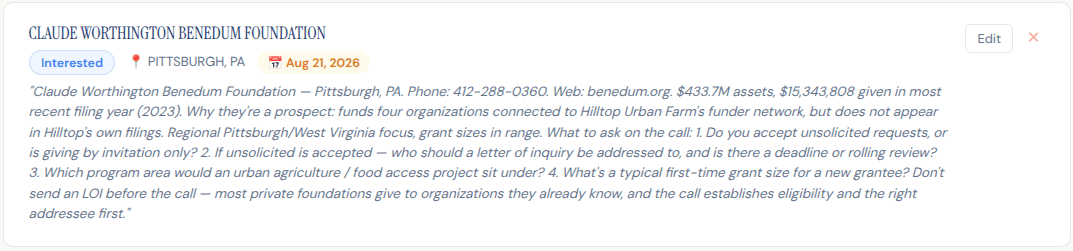
Both land in your GrantSnag pipeline with a real next step attached, and turn up in Wednesday’s reminder email. Two sentences, start to finish. Swap in your own organization and one that looks like it.
Why the call comes before the letter
Many private foundations don’t accept unsolicited requests at all. They give to organizations they already know. A short call tells you whether you’re eligible and who a letter of inquiry should be addressed to, before a week disappears into writing one. The 990 gives you the phone number and the officers. The call gives you the answer. That is the next action worth a reminder.
Why the backwards search matters
| Funder → grantee | “Who has this foundation given to?” Every grant database can answer this. |
| Grantee → funder | “Which foundations have funded this organization?” This needs every filed grant matched back to the recipient across 13.9M records. That matching is the hard part, and it is what GrantSnag is. |
| The loop | Run it backwards from an organization like yours, then again from the foundations that funded it, and warm prospects surface that no list of open opportunities contains. |
There is no AI inside GrantSnag. Every figure above comes from a filed IRS 990, covering 225.7K organizations. Connecting an assistant simply lets it read that data instead of guessing at it.
Connecting it
- Add the server. In your assistant’s connector settings, add a new connector with this address:https://grantsnag.com/api/mcp
- Sign in to authorize. Your assistant opens a GrantSnag sign-in page. Use your normal email and password and approve access. There are no keys to copy, and you stay connected until you disconnect.
- Name your organization and one like it. Ask it to find funders for your nonprofit, and to run the same search on a peer. The comparison is where the prospects are.
What it costs
Monthly signups start with a 3-day free trial.
The connector is included with every paid plan at no extra cost.
If something isn’t working
- Not connecting? Check that your subscription is active on your account page.
- Prompts or playbooks not showing up? Some assistants don’t surface them yet, but the built-in guidance still works in every client.
- Still stuck? Get in touch and we’ll sort it out.